What Is a Data Center and How Does It Work Explained
Discover what is a data center and how does it work, from power and cooling layers to colocation, hyperscale, and edge models in this clear technical guide.
14 min read
A data center is a specialized physical facility that houses servers, storage systems, and networking equipment so digital information can be stored, processed, and distributed reliably at scale. It works by turning grid electricity into compute output, while engineered cooling, redundant power, and high-bandwidth connectivity keep workloads running 24/7.
That's the short answer, but the useful answer is easier to understand if the reader follows a simple chain. A video starts buffering, a payment gets authorized, or a chatbot replies, and behind that moment is a controlled building built to keep those digital services alive even when parts of the environment fail. The shape of that building matters because it isn't office space with more cables, it's a managed system designed for continuous operation, physical security, and backup systems that reduce downtime risk. For a quick look at how these facilities are organized across markets, a public directory such as Data Centers List's global facility map shows how the industry is spread across active, planned, and under-construction sites.
Table of Contents
- What a Data Center Actually Is in Plain Terms
- The Four Layers That Make a Data Center Work
- How Power and Cooling Keep Workloads Running
- Colocation, Hyperscale, and Edge Models Compared
- Why Cooling Choices and Water Use Matter Now
- Reading the Global Data Center Map Like an Analyst
- Putting the Data Center Mental Model to Work
What a Data Center Actually Is in Plain Terms
A mobile payment feels instant, but it usually passes through a facility built to handle millions of similar requests without flinching. That facility is the data center, a place where the work happens on servers, storage, and network gear arranged to keep digital services available even under load. The best plain-English definition is simple, it's a managed environment for continuous computing, not just a room full of machines.
Follow one request from screen to facility
When a person streams a clip or sends money from a phone, the request doesn't stay abstract for long. It travels over a network to a data center, where a server processes it, storage supplies the needed file or record, and networking equipment sends the result back out. The reason the experience feels uninterrupted is that the building is designed to absorb routine failures and keep the service moving.
That design includes physical security, backup systems, and redundant electricity. Those pieces matter because the building has to behave more like infrastructure than a workplace. An office can tolerate interruptions, but a data center is built for a world where downtime is expensive and continuity is the baseline expectation.
Why the idea isn't new
The concept also has a long history. Sources tracing the sector's origins point back to the 1940s, and early centralized computing systems such as ENIAC are often treated as foundational examples of the model. What changed over time wasn't the basic need for centralized compute, it was the scale, the diversity of workloads, and the expectations for reliability.
Practical rule: if a service needs to keep running while people are sleeping, traveling, or buying something online, there's probably a data center behind it.
That helps explain why the term shows up around cloud services, business databases, streaming, payments, and AI workloads. Those services all need concentrated compute and storage capacity, plus the infrastructure that keeps them online when demand rises or components fail. In plain terms, a data center exists because digital life needs a physical home that's built to behave predictably under pressure.
The Four Layers That Make a Data Center Work
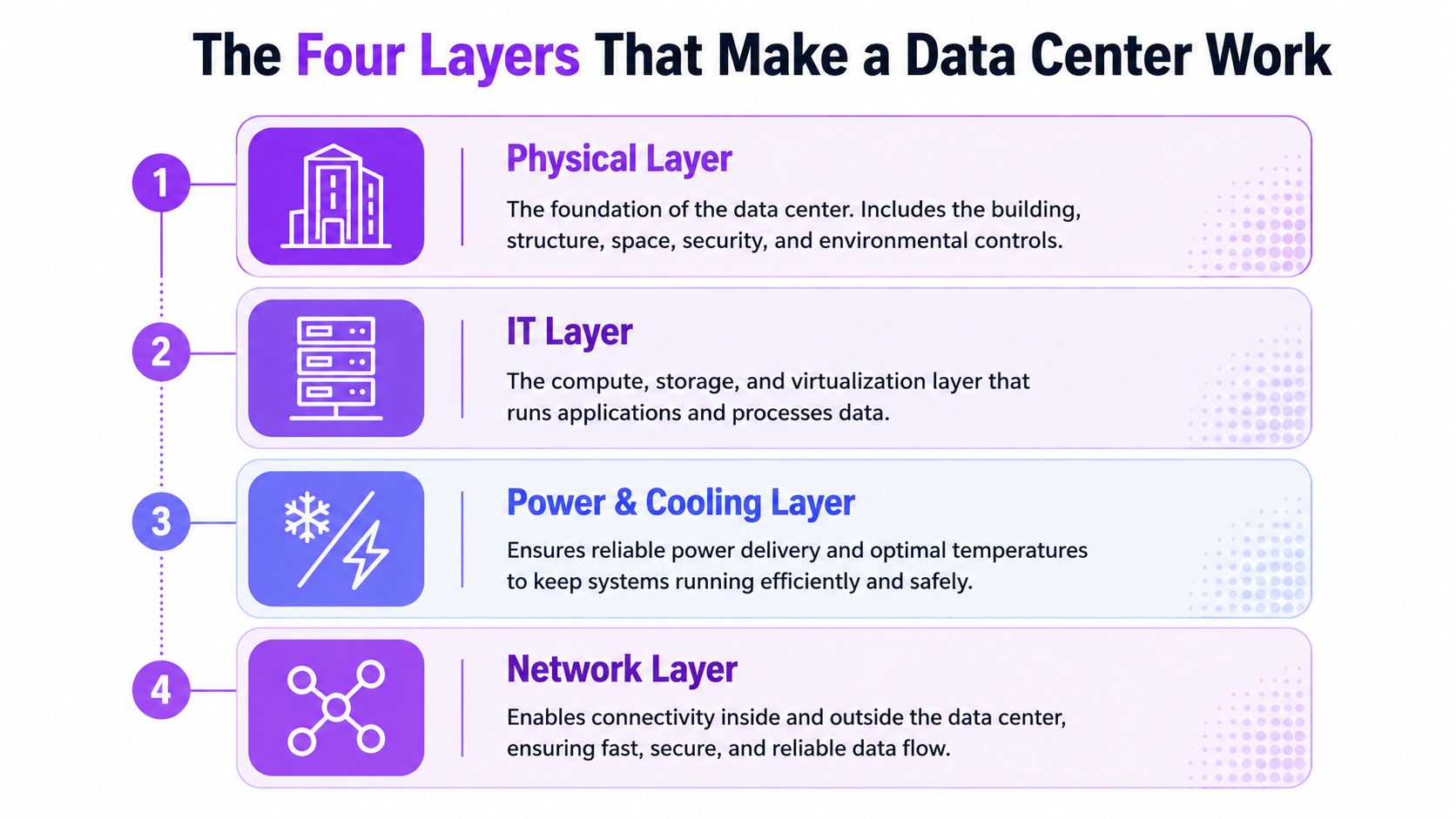
A data center looks like a building, but the useful mental model is four interdependent layers, compute, network, power, and cooling. It functions like a factory floor. The machines do the work, the conveyor system moves material, the utility feeds the plant, and the ventilation keeps the place from overheating.
Compute is the workload engine
The compute layer is where applications run. It includes servers, storage, virtualization, clusters, and accelerators such as GPUs, all of which execute instructions and handle data. If the workload gets denser, more compute has to fit into the same footprint, and that raises the pressure on the other layers.
Network moves the work around
The network layer connects machines inside the facility and links the facility to the outside world. It carries traffic between storage, servers, internet paths, and wider-area connections, which is why network design is part of the core architecture rather than a side concern. A facility can have plenty of servers and still underperform if traffic can't move cleanly between them.
Power and cooling set the operating ceiling
The power layer delivers electricity in a controlled path, and the cooling layer removes the heat that electricity turns into after computation. That's the key constraint often overlooked. More compute density means more heat and more electrical demand, which forces stronger distribution, stronger protection, and more aggressive heat removal. The layers don't sit beside each other, they limit and enable each other.
A facility's real capacity isn't just how many servers fit in the room. It's how much compute the power and cooling layers can support without losing stability.
A quick way to evaluate any facility
- What does it compute? A cloud cluster, a storage-heavy database stack, or GPU workloads each stress the building differently.
- How does it connect? Internal traffic, internet access, and routing shape performance.
- How is it powered? The path from grid to rack determines resilience.
- How does it shed heat? Air, liquid, or hybrid cooling changes everything downstream.
That four-part check is more useful than asking whether a site is “big” or “modern.” It shows how the building behaves as a system, which is what matters once workloads start piling up.
How Power and Cooling Keep Workloads Running
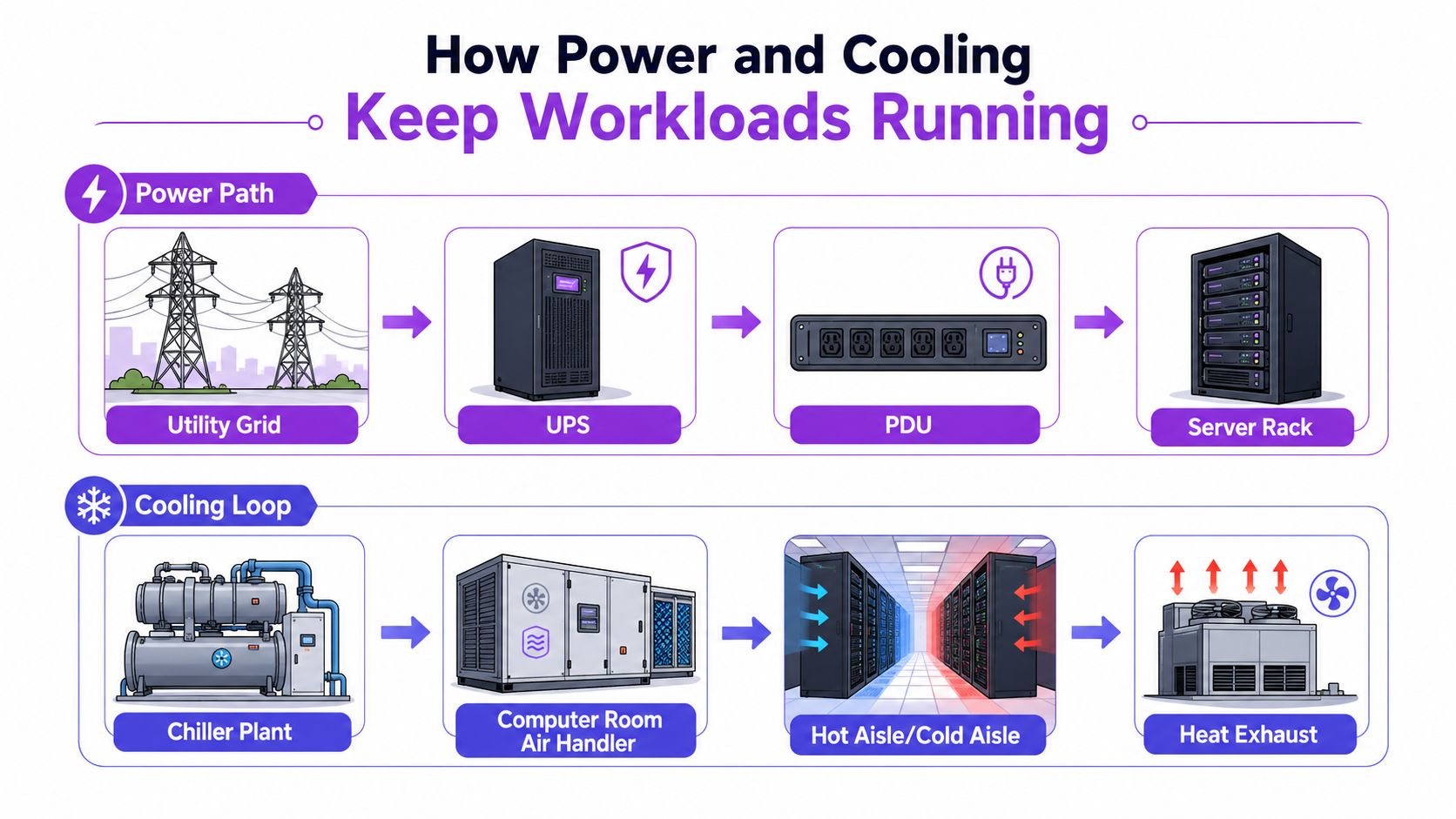
The power path inside a data center is built as an end-to-end chain from the utility grid into the facility, through on-site substations or transformers, then through medium-voltage and low-voltage distribution and switchgear to the IT load. That topology is central to reliability because it defines how quickly power can be isolated, protected, and redistributed during faults or maintenance. The engineering goal is simple to say and hard to achieve, convert grid power into usable voltages with minimal interruption while keeping redundant paths ready when something breaks.
The power route is the product
Inside the building, redundancy isn't a luxury feature. It's the design intent. Industry and government sources emphasize redundant electricity systems, backup power supplies, and high-capacity network connections because uptime depends on being able to absorb component failure without taking down the workload. That's why operators think in terms of feeds, switchgear, protection, and transfer behavior instead of just “power on, power off.”
Servers then turn that electricity into computation, and part of that energy becomes heat. The cooling system has one job, remove that heat continuously so critical equipment keeps running. An explainer of facility behavior frames it clearly, power enters the building, servers compute, and HVAC systems continuously extract heat so the equipment doesn't overheat.
Why heat is never an afterthought
Heat is not a side effect that gets handled later. It's part of the operating budget from the moment the racks are populated. If cooling lags behind compute density, the facility has to throttle workload, or the equipment risks instability. That's why modern sites are designed around hot and cold air paths, chilled water loops, or liquid systems, depending on the workload and the location.
The broader point is that power and cooling don't just support the data center, they define how much useful work it can do. A site with excellent connectivity but weak thermal handling still has a ceiling. A site with strong cooling but fragile electrical distribution still has a ceiling. Real capacity appears only when both systems are engineered to match the compute load.
Colocation, Hyperscale, and Edge Models Compared
The phrase “data center” hides a lot of operating models. Some facilities are shared buildings where many tenants place their own equipment. Some are giant cloud campuses owned and run by one provider. Others sit closer to users and devices because speed matters more than sheer scale. Those differences reshape the four layers in very practical ways.
Who owns what changes how the facility behaves
In colocation, the building is usually owned and operated by one party, while tenants own the IT gear. That means power density, security, and cooling have to support multiple customer profiles under one roof. In hyperscale, the building and the IT stack often move together under one operator's control, which makes it easier to standardize layouts, automate operations, and tune the entire stack for one workload pattern. In edge, the footprint is smaller and placed closer to the users or devices that need low-latency service, so the site often optimizes for locality and fast response rather than massive scale.
| Model | Who Owns the Building | Who Owns the IT Gear | Typical Workloads | Power and Cooling Emphasis |
|---|---|---|---|---|
| Colocation | A facility operator | The customer | Mixed enterprise systems, private infrastructure, shared deployments | Flexible distribution, tenant separation, resilient cooling for varied densities |
| Hyperscale | The cloud operator | The same cloud operator | Large-scale cloud platforms, heavy automation, dense compute | Standardized power paths, high-efficiency thermal design, repeatable layouts |
| Edge | A local or regional operator | Often the service owner or a tenant | Latency-sensitive applications, localized processing, regional delivery | Compact power design, simplified cooling, fast deployment in smaller footprints |
Why each model favors a different footprint
A financial services team may want control over hardware but not want to build a building from scratch, so a colocation site fits the operating model. A global cloud platform needs repeatability and a lot of room for standardized infrastructure, so hyperscale works better. A regional service that needs quick response may choose edge because physical proximity can matter more than raw size.
The right model is the one that matches workload shape, not the one that sounds most impressive in a slide deck.
That's why a site tour should start with ownership and workload, not with square footage. Once those are clear, the rest of the design choices start to make sense.
Why Cooling Choices and Water Use Matter Now
Cooling used to sound like a background utility question. It doesn't anymore, because the trade-offs now show up in water demand, local infrastructure, and the shape of new AI-oriented facilities. Public disclosures make the issue concrete, Google reported 24 billion liters of water withdrawal for data center operations in 2023, and Microsoft reported 9.7 million m^3 of water consumption in FY2024. Those disclosures matter because they show cooling choices affecting local water stress, not just internal efficiency.
Different cooling methods create different trade-offs
Air cooling, evaporative cooling, and liquid cooling don't behave the same way. Air cooling relies on moving chilled air and tends to use relatively little water, while evaporative systems can handle heavier heat loads but consume more water as it evaporates with waste heat. Liquid cooling changes the heat transfer path again and is one reason some AI-oriented designs are moving toward water-free approaches for certain workloads.
A useful way to think about this is that the facility is always paying for heat somehow. If it uses less water onsite, it may need more energy. If it saves energy, it may shift water demand elsewhere or change where the burden shows up. That trade-off is why water can't be treated as a footnote.
Local context changes the judgment
The same cooling system can be manageable in one place and difficult in another. A site in a water-rich area faces a different public impact than one in a stressed basin where every withdrawal competes with other users. That's why the right question is not just whether a facility is “efficient,” but what kind of cooling it uses, how much water it withdraws, and whether the watershed can absorb the load.
The discussion becomes even sharper around AI workloads, because the newest designs are forcing operators to rethink the thermal plan altogether. Microsoft has said it is developing new water-free cooling systems for certain AI workloads, which shows the architecture is still changing rather than settled. For a facility profile with sustainability context, Data Centers List's listing for the Soya Green Data Center is an example of how location and local conditions can be surfaced alongside the site itself.
A practical checklist for readers
- Ask about the cooling method. Air, evaporative, liquid, or a hybrid system changes resource use.
- Look for water disclosures. Onsite water use is often the most local impact.
- Check the watershed context. A site in a stressed basin deserves closer scrutiny.
- Separate onsite and indirect effects. Cooling and electricity generation don't create the same footprint.
That's the key lesson. Cooling isn't a back-room detail, it's one of the main ways a data center interacts with the place where it's built.
Reading the Global Data Center Map Like an Analyst
A single facility tells only part of the story. The broader market picture shows how many sites exist, where they're being built, and which operators are concentrating capacity. A public directory becomes useful because it turns scattered facility facts into a comparable map, including city, region, country, operator, operational status, and IT power in MW. For an operator or analyst, that standardized view is what turns a long list of buildings into a market model.
Status tells you where the pipeline is going
Status labels matter because they reveal supply that isn't online yet. Active, planned, and under construction aren't just administrative tags, they show whether a market is already operating, filling out, or expanding. That matters when someone is trying to understand competitive pressure, future availability, or whether a region is still absorbing new capacity.
Capacity and geography are stronger together
A ranked list by power capacity is useful on its own, but it becomes much more informative when paired with geography. Markets such as Northern Virginia, Dublin, London, Frankfurt, Amsterdam, and Paris can be browsed quickly because they compress a lot of activity into regions that matter to cloud, colocation, and enterprise buyers. The point isn't to memorize every site, it's to see how concentration, location, and operator footprint line up.
Data Centers List's operator index also helps by consolidating assets by brand and market, which makes it easier to see whether a company is building a broad portfolio or concentrating in a few places. That's especially helpful when comparing disclosed figures with AI-estimated values, since the platform labels estimated values instead of blending them.
Analyst habit: read the map in layers, first status, then capacity, then operator, then local context.
The best directories don't just answer “where is it?” They help answer “what does it mean?” That's the difference between a contact list and a market view.
Putting the Data Center Mental Model to Work
A data center is easiest to understand as a living system shaped by workload demand. The four-layer model, compute, network, power, and cooling, explains why one site feels stable under pressure while another runs close to its limits. The operating model then adds the next layer of context, because colocation, hyperscale, and edge sites each distribute ownership and risk differently.
The smartest next move is to evaluate facilities with those questions in mind. Ask what the site computes, how it connects, how it's powered, and how it sheds heat. Then ask what the local water and grid conditions look like, because the building doesn't exist in isolation.
For market work, a public directory can help turn those questions into a repeatable process. A crawlable facility list, operator pages, ranked capacity views, and local context make it much easier to compare sites without guessing at the underlying structure.
If this topic matters for site selection, market analysis, or infrastructure planning, visit Data Centers List to browse facility profiles, compare operators, and see how data center markets are organized across regions. It's a practical place to connect the four-layer model to real sites, real status labels, and the local context that shapes every facility.