Advanced Industrial Computer Guide for Edge and Data Center
Explore what an advanced industrial computer is, from fanless rugged specs to edge AI use cases, selection criteria, and lifecycle planning for OT environments.
15 min read
The global industrial computer market grew from USD 3.53 billion in 2017 to USD 4.78 billion in 2022, with a projection of USD 5.96 billion by 2027, according to market data on industrial computer expansion. That growth matters less as a market headline than as an infrastructure signal. Industrial computers are moving from isolated control terminals toward distributed compute nodes that process data close to machines, substations, communications sites, and edge facilities.
The buyer's difficult decision is no longer just whether a system can run today's application. The question is whether the platform can support changing workloads without forcing an expensive enclosure replacement, while remaining secure enough for an operational technology environment. A fixed system may deliver more capacity immediately. A modular advanced industrial computer may preserve more options over the deployment lifecycle.
Table of Contents
- Why Advanced Industrial Computers Are Reshaping Infrastructure
- What Defines an Advanced Industrial Computer
- Engineering Behind Fanless and Wide-Temperature Operation
- Where Advanced Industrial Computers Earn Their Place
- Future-Proofing Through Modular and Upgradeable Platforms
- Securing Advanced Industrial Computers in OT Environments
- Selection Checklist for Your Next Deployment
Why Advanced Industrial Computers Are Reshaping Infrastructure
The category's expansion reflects a change in where computation happens. Industrial sites increasingly need local processing for machine vision, automation, monitoring, and operational analytics, especially where sending every signal to a remote data center would add latency, consume connectivity, or increase dependency on an external service. An advanced industrial computer therefore acts as both a hardened endpoint and a local infrastructure node.
Market estimates show the direction clearly, although forecasts differ by methodology. One estimate places the industrial computer market at about USD 5.87 billion in 2023 and projects USD 10.75 billion by 2032, with IIoT, edge computing, and factory automation identified as major growth drivers in the industrial computer market overview. The implication for infrastructure planners is practical: industrial compute is becoming part of the architecture rather than an afterthought attached to a machine.
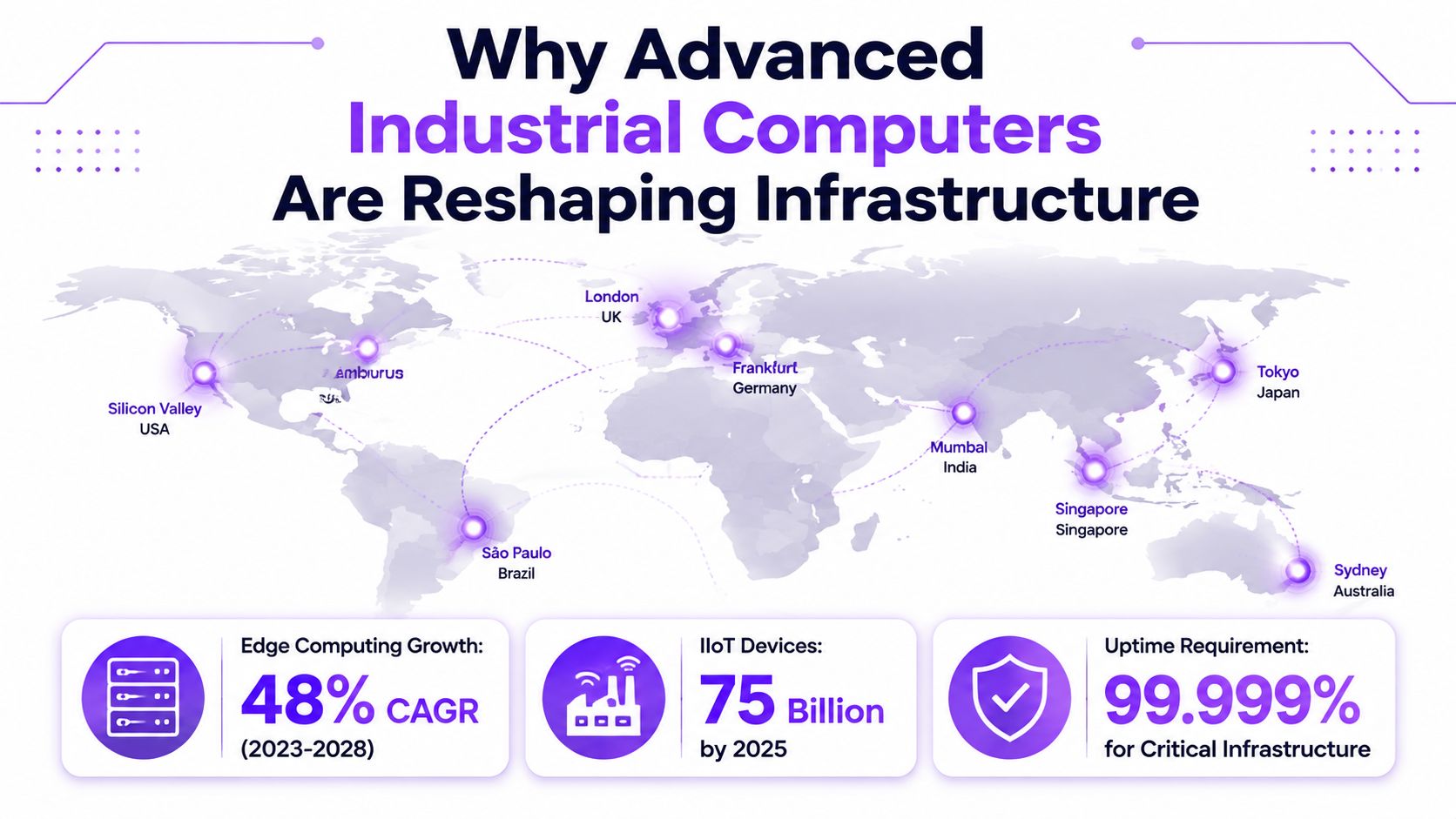
From passive terminals to active edge nodes
Earlier industrial deployments often emphasized data acquisition and control. Newer systems may also perform localized inference, protocol translation, filtering, visualization, and workload orchestration. That shift changes the specification. A platform must handle sustained computation, environmental stress, industrial I/O, and security maintenance at the same time.
This is why the same hardware category now appears in factory networks, utility infrastructure, remote communications sites, and data center edge designs. A facility directory such as the Leibniz Supercomputing Centre data center profile can help planners understand the broader physical context around distributed compute locations, but the industrial computer itself still has to operate at the point where data originates.
The strategic consequence
Infrastructure teams should stop treating industrial computers as disposable appliance purchases. Their enclosure, thermal design, processor module, I/O architecture, firmware support, and network position all influence the long-term operating model.
Practical rule: A system that only meets the current workload may be technically adequate today but strategically weak if its next processor, firmware release, or security update cannot be integrated without a full replacement.
What Defines an Advanced Industrial Computer
An advanced industrial computer earns its designation through a combination of environmental tolerance, thermal architecture, electrical resilience, serviceability, and lifecycle planning. A commercial PC may have ample processing power in a controlled room, but that doesn't make it suitable for a dusty production line, a vibrating cabinet, or a utility substation exposed to electromagnetic disturbance.
The first distinction is environmental. Industrial designs may support wide operating ranges such as -40°C to +70°C, while other rugged edge systems are rated for operation up to 70°C, as documented in industrial computer environmental and compliance specifications. The rating matters only when the vendor states the workload, ambient conditions, mounting orientation, and validation method behind it.
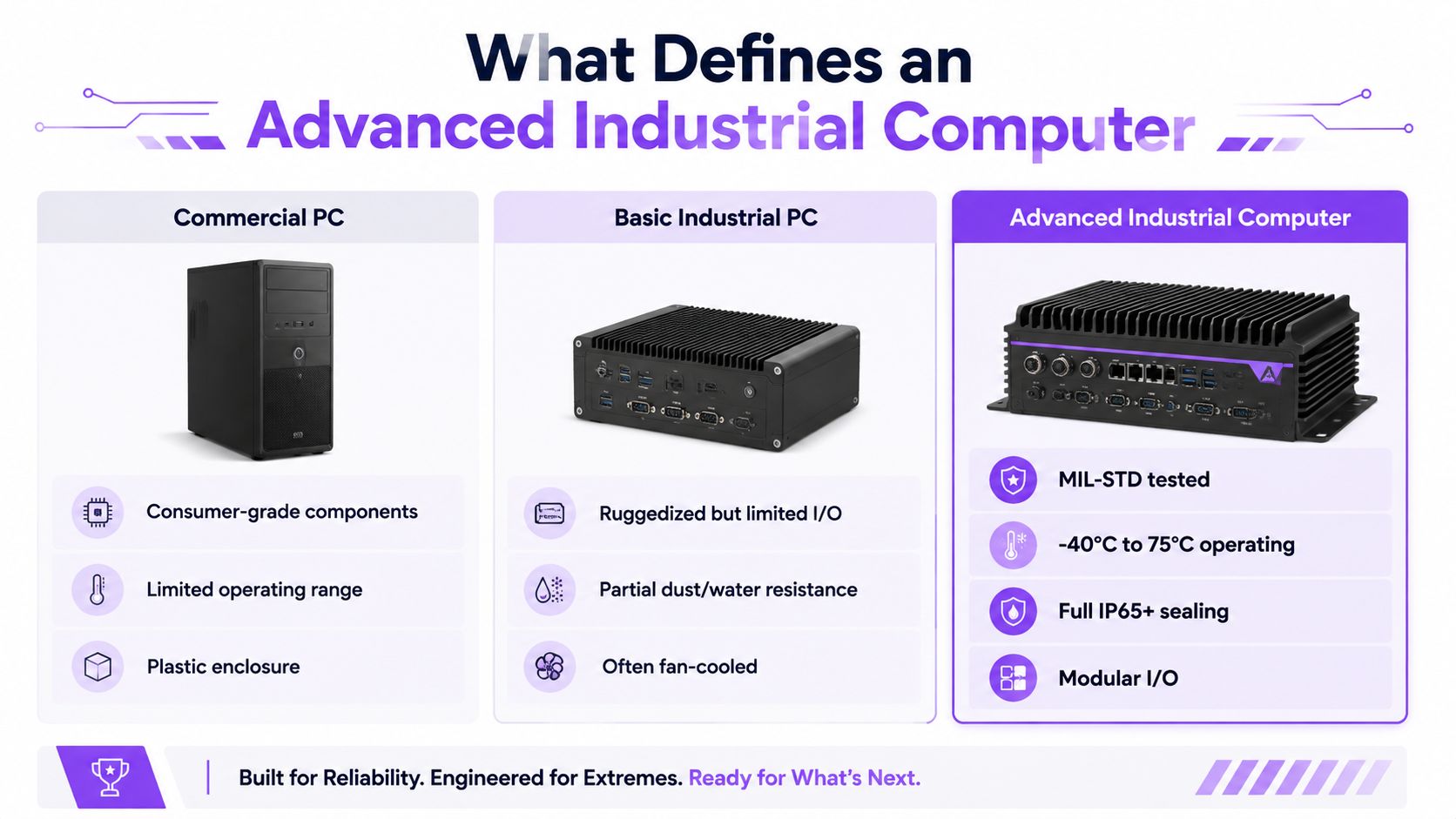
The specification layers that matter
A useful evaluation separates marketing language from engineering evidence:
- Thermal envelope: The vendor should identify whether the temperature range applies at idle, under a defined CPU load, or across the intended sustained workload.
- Cooling method: Fanless systems remove moving airflow from the primary enclosure, but they need a chassis and heat-transfer path sized for the processor's real dissipation.
- Electrical resilience: Utility and OT deployments may require targets such as IEC 61850-3 and IEEE 1613, which address electromagnetic disturbance and environmental stress in substations and similar infrastructure, as described in the compliance reference for rugged edge computers.
- I/O and expansion: Industrial Ethernet, serial interfaces, fieldbus support, isolated I/O, storage options, and expansion slots determine whether the system can integrate with existing PLC and SCADA environments.
- Lifecycle evidence: A buyer needs documented component availability, firmware maintenance, replacement procedures, and an approved path for revisions.
The commercial PC comparison
A commercial PC normally assumes clean air, stable power, moderate ambient conditions, and a replacement model based on a short product cycle. An advanced industrial computer assumes the opposite. It must be installed, monitored, serviced, and secured as part of a larger operational system.
The result is a procurement test rather than a label. If a vendor can't explain thermal validation, electrical compliance, component continuity, and security support, the platform may be ruggedized without being suitable for critical industrial use.
Engineering Behind Fanless and Wide-Temperature Operation
Fanless operation isn't a commercial computer with its fan removed. The design relocates the thermal path from a small active heatsink to the entire enclosure. Heat travels from the CPU and chipset through a thermal interface into an aluminum chassis, then moves outward through fins, heat pipes, and natural convection.
A cited fanless design used a dual-layer heatsink and liquid-metal thermal interface, reporting 1.7 times greater convective cooling and the ability to dissipate more than three times the thermal energy of similarly sized fanless PCs, as described in the fanless industrial computer cooling design. Those figures apply to that cited design, not to every fanless system. Buyers should treat them as evidence of what architecture can achieve, not as a universal product-class guarantee.
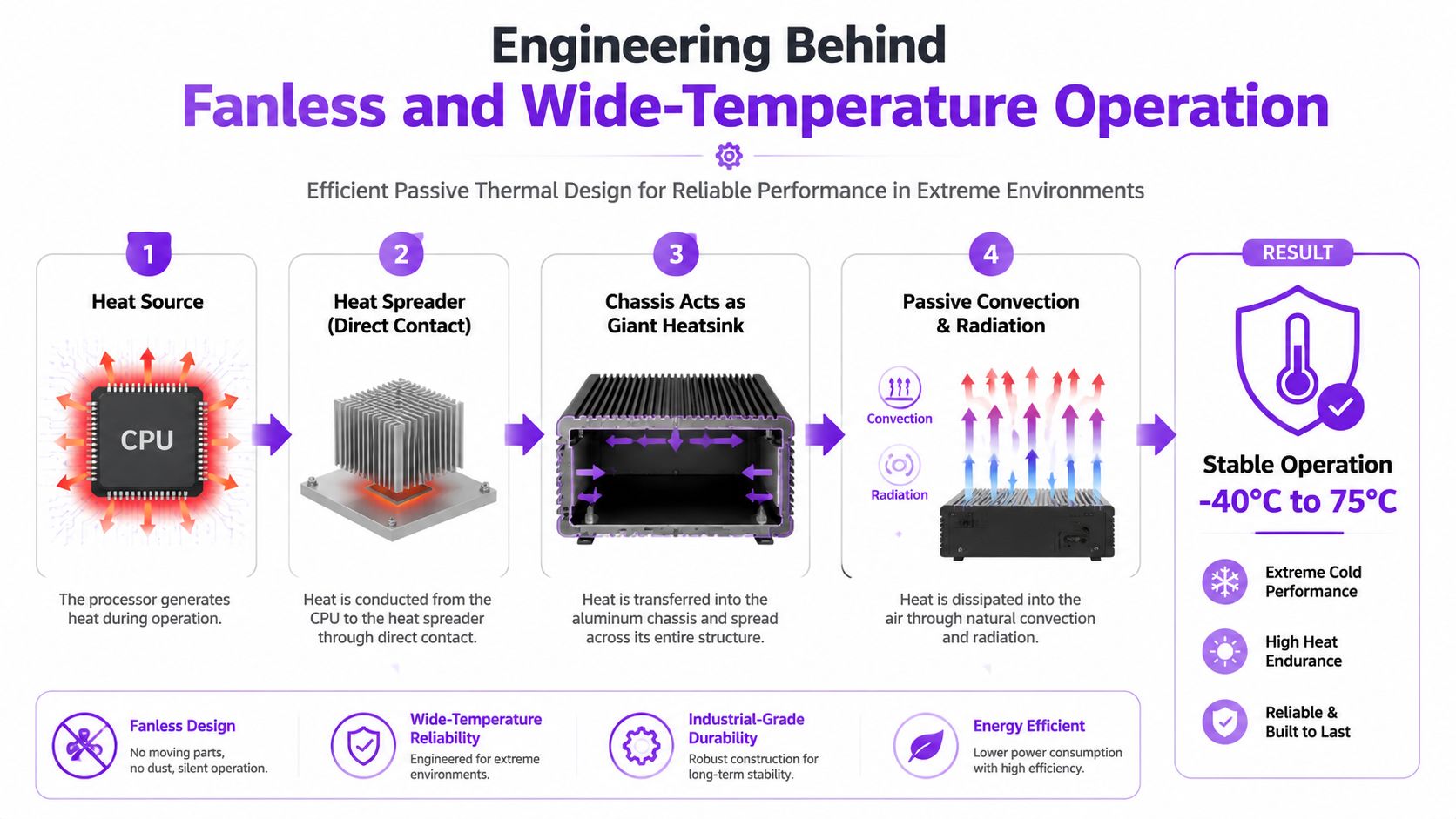
Why removing fans changes reliability
Fans introduce bearings, moving blades, vibration, and an airflow path for dust and debris. In a continuously operating cabinet, those factors create maintenance requirements and potential failure points. A sealed or substantially enclosed fanless design can reduce exposure to contaminants and vibration-related mechanical failure, provided the enclosure itself can reject heat effectively.
The trade-off is equally important. A fanless chassis depends on installation conditions. Restricted airflow around the enclosure, direct solar loading, incorrect mounting, or a workload above the validated thermal envelope can undermine the design. Passive cooling reduces one class of risk, but it doesn't eliminate thermal management.
Read temperature ratings as test conditions
A temperature range on a datasheet should prompt further questions:
- What processor load was sustained during validation?
- Which storage and memory configuration was installed?
- Was the test conducted in the final enclosure and mounting orientation?
- What performance behavior occurs when the system reaches its thermal limit?
- Does the rating apply to the complete system or only selected components?
Examples in the source set include systems validated at 35W to 65W CPU loads, with ambient limits around 50°C and 35°C respectively, demonstrating why two systems with similar headline temperature claims may behave differently under sustained computation. The documented wide-temperature and industrial compliance examples support a disciplined reading of these specifications. Thermal validation should be tied to the exact workload, not copied from a product family summary.
Where Advanced Industrial Computers Earn Their Place
A remote edge site may have limited cooling, intermittent physical access, and a requirement to process local data before forwarding selected results upstream. A commercial PC can run the application in a laboratory, but its fans may draw contaminants into the enclosure, and its operating assumptions may fail when ambient conditions change. An advanced industrial computer addresses the problem by combining passive or controlled thermal design with storage, networking, and I/O suited to the deployment.
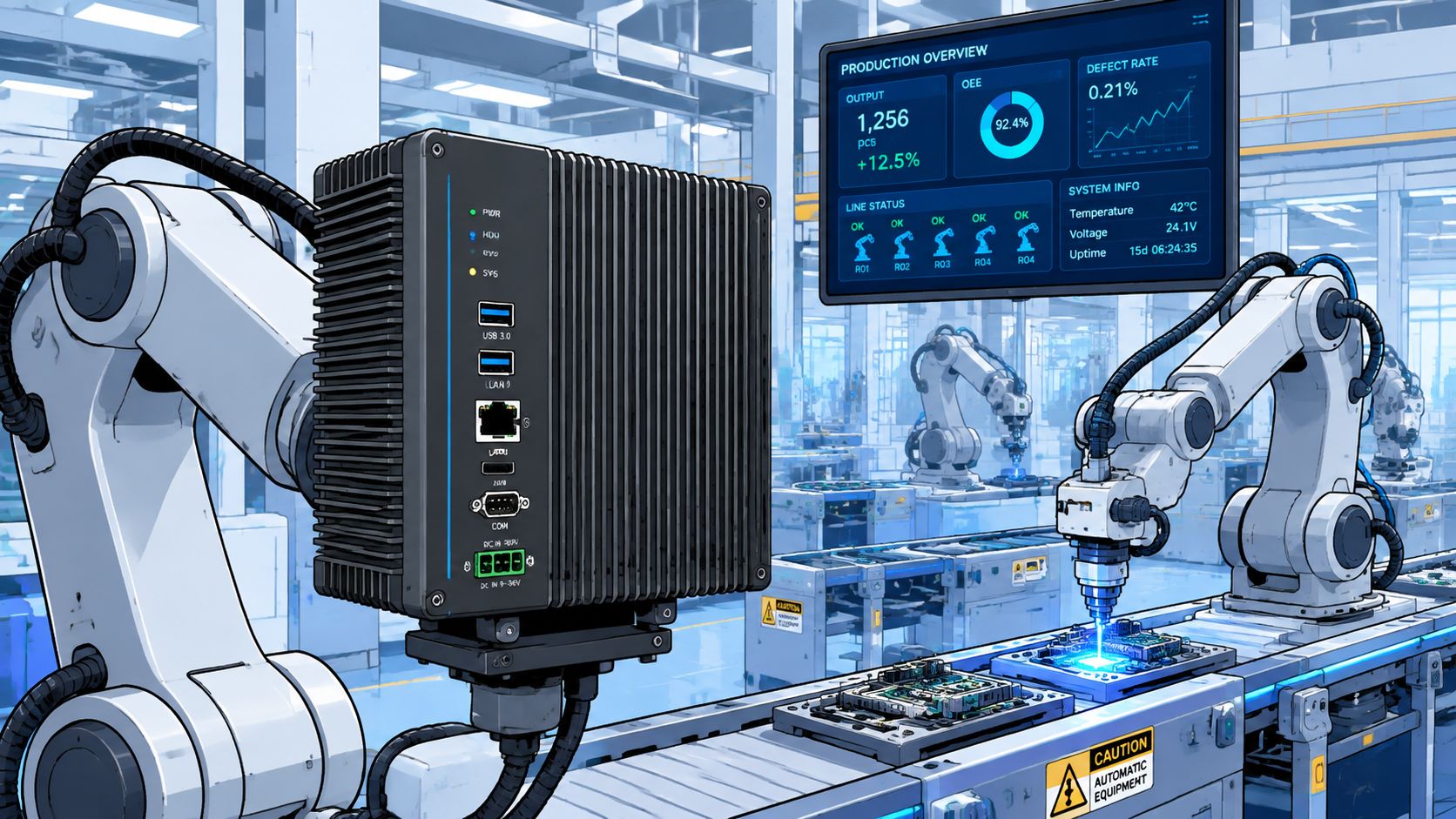
Manufacturing and machine vision
On a production line, the computer may receive camera feeds, inspect assemblies, exchange commands with controllers, and record exceptions. The system needs predictable processing, industrial communications, and resistance to vibration and particulate exposure. A failure doesn't only interrupt a screen. It can interrupt a control sequence or force an operator to move into a manual process.
The right design depends on the workload. Some inference tasks can run on integrated acceleration, while more demanding applications may require a discrete accelerator and a thermal architecture designed around it. A buyer shouldn't select the processor first and ask about cooling later. The compute module, accelerator, enclosure, power supply, and airflow strategy have to be evaluated as one system.
Utility substations and critical OT
Substation deployments impose a different constraint. Electromagnetic disturbance, environmental stress, legacy protocol integration, and controlled maintenance windows matter as much as raw compute. In that setting, IEC 61850-3 and IEEE 1613 are useful benchmarks because they indicate that the platform has been designed for conditions beyond ordinary office IT, according to the industrial compliance documentation.
Edge facilities and telecommunications sites
At an edge facility, an industrial computer may support local monitoring, protocol conversion, security telemetry, or inference without sending every event to a centralized environment. At a telecommunications site, the same platform may need to operate with minimal on-site intervention and limited environmental control.
A facility such as EdgeConneX Toronto illustrates why site context matters to infrastructure planning. The computer's suitability still depends on cabinet conditions, power quality, network segmentation, service access, and the workload profile. The deployment wins when the hardware's specific resilience matches the site's actual stressors, not when the specification sheet contains the longest list of features.
Future-Proofing Through Modular and Upgradeable Platforms
The most expensive procurement mistake may not be buying too little compute. It may be buying a fixed system with no credible upgrade path, then replacing the entire enclosure when an application needs a newer processor or accelerator.
Market research identifies embedded box industrial PCs as a faster-growing segment, with a projected 8.53% CAGR through 2031, because compute-on-module designs can allow processor upgrades without replacing the full enclosure, according to the industrial PC market segmentation forecast. The same source set describes broader industrial PC forecasts ranging from roughly 3% CAGR from 2026 to 2035 to 4.5% to 7.5% through 2031, depending on the forecast. Those differences reinforce a buyer concern: industrial assets often remain in service long enough for lifecycle flexibility to matter more than launch-day specifications.
Fixed and modular choices
| Criteria | Fixed High-Spec System | Modular Upgradeable Platform |
|---|---|---|
| Initial capability | Buys substantial capacity immediately | Buys capacity closer to the present workload |
| Upgrade method | Often requires full system replacement | May permit processor or compute-module changes |
| Capital exposure | Higher risk of unused capacity or stranded capability | More incremental investment over time |
| Integration risk | Known configuration at deployment | Future modules require validation and compatibility checks |
| Downtime planning | Replacement can involve enclosure, wiring, and software migration | Module replacement may reduce the physical change, but still requires testing |
| Best fit | Stable, demanding workload with limited expected change | Evolving workload and long service horizon |
The decision should follow workload uncertainty
A fixed high-spec system can be rational when the workload is known, sustained, and already close to the required capacity. It may also simplify qualification because the hardware configuration remains stable. Overbuying becomes harder to justify when the future workload is uncertain and the additional capacity may remain unused.
A modular platform is more attractive when AI inference, machine vision, protocol processing, or analytics requirements are likely to evolve. However, modularity isn't automatically economical. The buyer must verify that future modules will be available, electrically compatible, thermally supported, firmware-supported, and qualified for the same environmental conditions.
Lifecycle test: The platform should be judged by the cost and risk of the next upgrade, not only by the purchase price of the first installation.
What procurement teams should demand
The vendor should document module interfaces, supported processor generations, thermal limits, firmware dependencies, replacement procedures, and validation responsibilities. The Vertiv OneCore data center profile provides an example of the type of facility context infrastructure teams may review while mapping distributed compute requirements, but hardware selection still requires a platform-specific lifecycle commitment.
The strongest decision is often neither maximum specification nor minimum cost. It is the configuration that provides enough present capacity, preserves a credible upgrade route, and limits the amount of infrastructure that must be requalified during the next refresh.
Securing Advanced Industrial Computers in OT Environments
Cybersecurity guidance becomes less useful when it treats an advanced industrial computer as an ordinary endpoint. In an OT environment, the device may run analytics while also bridging legacy PLC or SCADA systems, collecting operational data, and sitting inside a network where uptime takes priority over rapid change. A generic checklist can confirm that security software exists without answering whether firmware can be updated safely or whether the device is unnecessarily exposed.
Independent 2025 advisory coverage emphasized urgent firmware updates, network isolation, and removal of internet exposure for industrial control and ICS devices, as summarized in the 2025 ICS security advisory coverage. The practical lesson is device-level governance. The procurement process should establish how the system will be maintained before it reaches production.
Firmware is part of the asset
A buyer should request a documented firmware lifecycle, including release notifications, vulnerability handling, update authenticity, rollback behavior, and support expectations for older modules. Firmware signing verification matters because an update process must establish that the package came from an authorized source and hasn't been altered.
Patch governance also needs an operational mechanism. Teams should define who approves updates, which test environment mirrors the production configuration, how maintenance windows are selected, and what happens when a patch conflicts with a legacy driver or control application. “Patch when convenient” isn't a lifecycle plan.
Reduce exposure before adding controls
An industrial computer shouldn't be directly reachable from the public internet unless a documented architecture makes that exposure unavoidable and controlled. Network segmentation should separate business systems, edge compute, supervisory systems, and control networks according to the consequences of compromise and the required data flows.
A practical design usually includes:
- Restricted management paths: Administrative access should use controlled routes rather than open inbound exposure.
- Explicit data flows: Only required protocols and destinations should be permitted between the computer and PLC, SCADA, historian, or cloud services.
- Asset identity: Each device should have an owner, recorded firmware state, installed software inventory, and defined replacement status.
- Recovery preparation: Backups should cover configuration, application dependencies, and restoration procedures, not just the operating system.
- Legacy containment: Older systems that can't support modern controls should sit behind compensating segmentation and monitored gateways.
Evaluate the vendor's operating commitment
The vendor should explain how vulnerability disclosures reach customers, how long firmware remains supported, and whether replacement modules preserve the security model. Security isn't complete at shipment. It continues through every firmware change, application update, hardware revision, and decommissioning decision.
Selection Checklist for Your Next Deployment
The procurement team should begin with the site, not the processor. A system that looks powerful in a lab can be unsuitable if the cabinet has restricted airflow, the power input is unstable, the enclosure can't be serviced, or the network requires interfaces the platform doesn't provide.
Verify the environment
Record the actual ambient range, humidity exposure, dust, vibration, mounting position, power conditions, and service access. Then ask the vendor to map each condition to a documented rating. A broad temperature claim without workload and mounting details isn't enough.
The evaluation should confirm:
- Thermal validation: Obtain test conditions for the intended CPU, memory, storage, accelerator, and sustained workload.
- Enclosure design: Check heat-transfer paths, ingress protection, grounding, mounting, and clearance around the chassis.
- Electrical compliance: Match the deployment to applicable industrial disturbance and environmental requirements, including IEC 61850-3 or IEEE 1613 where substation conditions demand them, based on the industrial compliance reference.
- I/O fit: Verify every required network, serial, fieldbus, storage, display, and expansion interface.
- Performance behavior: Confirm whether the system throttles, shuts down, or degrades service when thermal or power limits are reached.
Test the lifecycle before signing
The central future-proofing question is whether a processor or compute module can be upgraded without replacing the enclosure. Ask for the supported module roadmap, component availability policy, compatibility matrix, firmware dependencies, and qualification process for future revisions. A modular claim without documented availability is only an option in theory.
Security questions belong in the same review:
- How are firmware packages authenticated?
- How are security advisories communicated?
- Can the device operate without direct internet exposure?
- What patch window and rollback process does the vendor support?
- Which legacy integrations are tested after updates?
- What configuration must be preserved for recovery?
Compare the deployment context
Facility location, operator, status, and power capacity can influence how an edge deployment is planned and supported. Data Centers List provides a directory and map for reviewing data center facilities and comparing those contextual fields, including operational, planned, and under-construction sites.
The final decision should document three outcomes: why the selected system meets present workload needs, how it will be upgraded if requirements change, and how operators will secure and recover it throughout its service life. If the vendor can't answer all three, the platform carries avoidable lifecycle risk.
Data center and OT teams can use Data Centers List to research facilities, operators, locations, statuses, and power-capacity context when planning distributed infrastructure around advanced industrial computers. Visit the directory before finalizing site strategy, then connect the facility requirements to the hardware, upgrade, and security decisions documented in the procurement review.